AI pixel art, for people shipping games
Not one nice sprite.
The same character, from every angle, animated, in your engine.
Describe a character once. Approve it once. Everything after that — eight directions, idle, walk, attack — is generated from that approved sprite, so it stays recognisably the same character. Exported as a folder Godot, Unity, Phaser or Flame already understands.
Every sprite on this page was generated by Pixelite. None of it is illustration.
The hard part
Anything can draw a knight. Drawing the same knight eight times is the problem.
Generate eight directions from a prompt and you get eight different people who all match the description. Pixelite generates them from your approved sprite instead, so the beard, the sash and the hammer survive the turn.
One character, eight directions
…and the same character, moving
Same beard. Same red sash. Same hammer. That is the entire product, and it is the thing that stops being true the moment a tool generates each asset from the prompt instead of from the character.
Carried forward
Approve one sprite. Everything after it is seeded from those pixels.


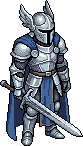
The silver plate and the blue cloak on the third sprite came from the first sprite’s pixels, not from repeating the words. See how the packs line up.
Four steps
From a sentence to a folder your engine imports.
- 01
Set the style
Tile size, perspective, palette. Applies to everything in the project, so a character made in month three still matches one from week one.
- 02
Describe a character
One concept, ten credits. Cheap enough to change your mind and try a different silhouette.
- 03
Approve it
Free — and the moment that matters. That sprite becomes the reference every later generation is seeded from.
- 04
Take the pack
Turnaround, idle, walk, attack — generated in parallel, validated, exported for your engine.
Checked, not hoped
Every sprite is inspected before you are charged for it.
Most AI pixel art fails on details you only notice once it is in the engine — soft edges that halo, pixels that are not really square, feet that drift between frames. Eleven automated checks run on every generation. If one fails, we retry. If it still fails, the credits go back automatically.
You are never charged for our failures.
- binaryAlpha
- No semi-transparent edge pixels. They halo in-engine and are the clearest tell of fake pixel art.
- trueGrid
- Real pixels, not a smooth render shrunk down. Checked, not assumed.
- paletteMembership
- Colours stay inside your locked palette. Drift stops being possible.
- baselineConsistency
- Feet stay on the ground across every frame. No floating.
- loopClosure
- A looping animation actually loops. No jump on the last frame.
- directionDistinct
- Front and back are different drawings. Not the same sprite twice.
Export
A folder, not a download of loose PNGs.
Sprite sheets plus the file your engine actually wants — a Godot SpriteFrames resource, Unity .meta files with the rects already sliced, a Phaser atlas, a Flame animation snippet. Exports are free, in every format, as many times as you like.
Your game already runs. Give it art that looks deliberate.
Start with one concept. Approve the one that belongs in your game, and let Pixelite carry it through every direction, animation and export.
No subscription. Credits never expire.